
Popular plc programmingindustrial automationconnect PLC to SCADA ModbusControlSystemsLadderLogicStructured Text

Learn · Build · Automate

Engineering content built like a control panel: tested, labeled, working.

Practical PLC, automation, mechatronics and embedded tutorials from a working engineer. Wire it, program it, understand why it works.

  • 23tutorials & articles
  • 1free resources
  • Tested on real hardware
Start / stop with seal-in RUN
Program listing (IL)
LD   X0
OR   Y0
ANI  X1
OUT  Y0
02 Learning paths

Not sure where to start? Follow a path

Each path is an ordered list of tutorials. Finish one and you can wire, program and troubleshoot that system on your own.

  1. 1 Beginner

    PLC fundamentals

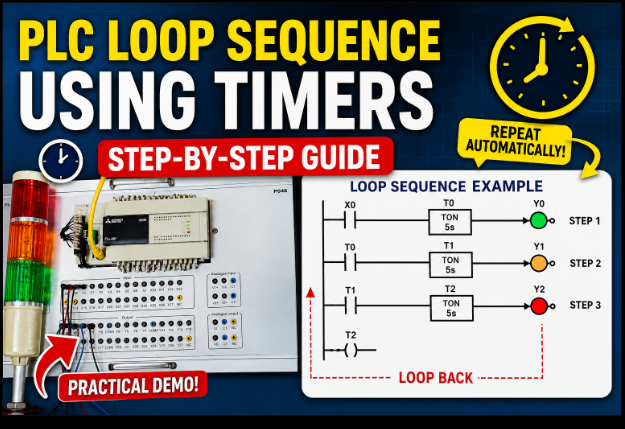
    Ladder logic, timers, counters and your first working machine sequence.

  2. 2 Intermediate

    Industrial networks

    Modbus RTU/TCP, Ethernet/IP and reading real device registers.

  3. 3 Beginner

    Sensors & field wiring

    NPN vs PNP, 4–20 mA loops, encoders and safe panel wiring.

  4. 4 Intermediate

    Embedded & IoT

    ESP8266/ESP32 and Arduino projects that talk to real equipment.

04 Ladder Lab

Press the buttons. Watch the rungs think.

A working PLC simulator in your browser. Inputs, contacts, coils and timers scan just like a real controller, so you can see why a seal-in or an interlock behaves the way it does.

  • Press and hold the input buttons; contacts turn teal when they pass power.
  • Watch seal-in, interlocks and timers work rung by rung.
  • Switch programs to try another circuit. No install, works on phones.

Open the full lab

Delayed start with a TON timer RUN
Program listing (IL)
LD   X0
OR   Y0
ANI  X1
OUT  Y0
LD   Y0
OUT  T0 K50
LD   T0
OUT  Y1
05 Latest

New tutorials and articles

Writing featured on
07 Library

Cheat sheets, program files and reading

All resources
08 FAQ

Questions people ask before starting

Do I need a real PLC to follow the tutorials?

No. Most tutorials work with free simulators, and the Ladder Lab on this site runs in your browser. Where hardware helps, the parts list says exactly what to buy.

Are the tutorials free?

Yes. Tutorials, the glossary and the calculators are free. Some downloads ask for your email so you get the files and the next tutorial.

Which PLC brands do you cover?

The concepts are vendor-neutral. Examples use common platforms such as Siemens, Allen-Bradley, Delta and OpenPLC, and each tutorial lists what it was tested on.

Can you help with my project or training?

Yes. Use the Work with me page to describe your project, team training or writing request.

Bob Odhiambo
Who writes this

Bob Odhiambo

I am Bob Odhiambo, a mechatronics and automation engineer. I program and commission PLCs, work with industrial networks and VFDs, and write for Control.com and EEPower. Everything here is built and tested on real hardware.

Full story Work with me

Build something that works this week

Pick a tutorial, wire it up, and get the next one in your inbox.

Start here