
If you learned to program before you learned to control a machine, ladder logic can feel like writing software with your hands tied behind your back. Structured text removes the ties. It looks like Pascal, reads like C, and lets you express sequencing, math, and data-handling logic the way you’d naturally think about it – as statements, conditions, and loops rather than as contacts and coils strung across a rung.
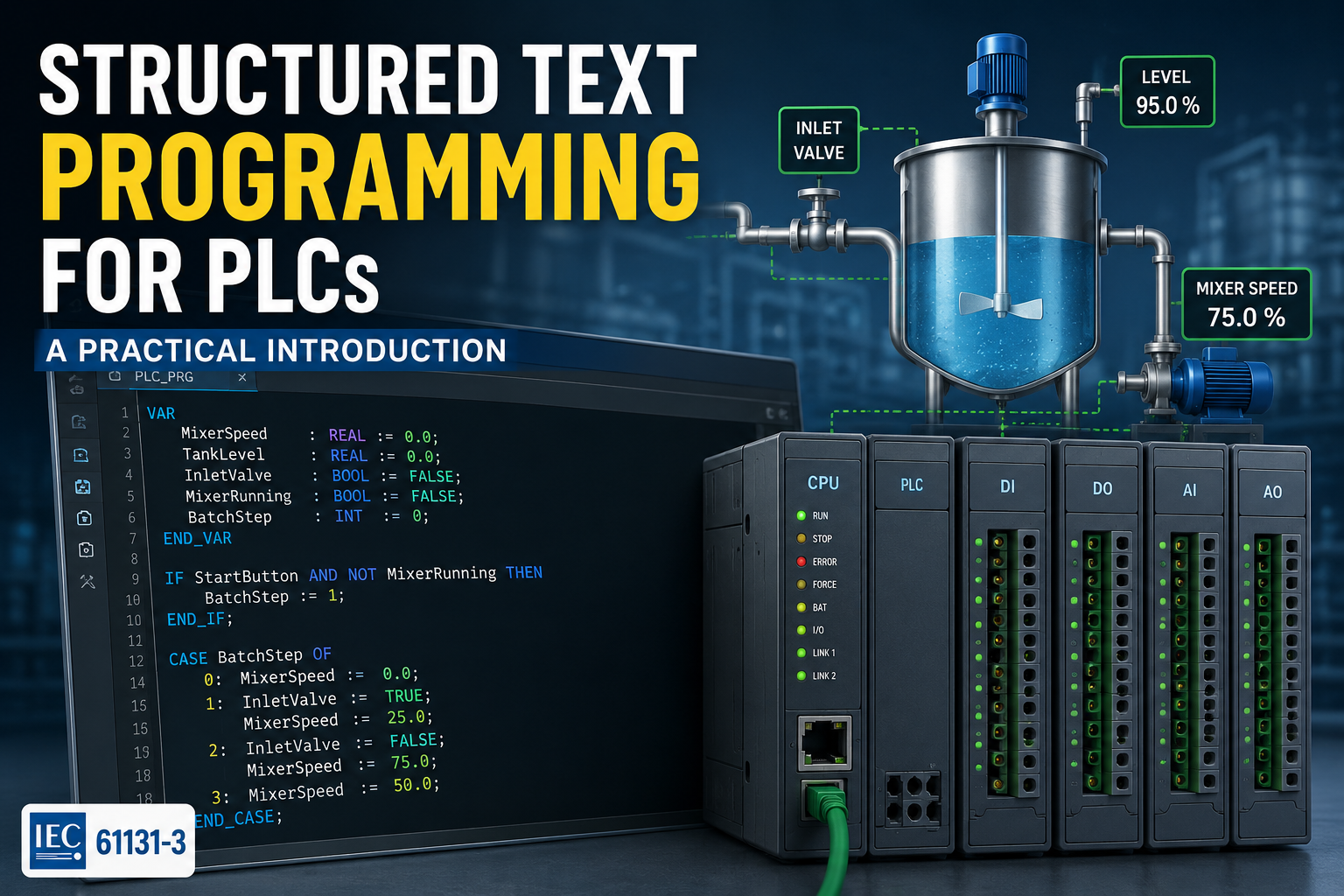
This article is a practical, hands-on introduction to structured text as defined by IEC 61131-3, the international standard that governs all five standard PLC programming languages. You’ll learn the core syntax, work through a realistic batch-mixing sequence from start to finish, and get a clear-eyed comparison of when ST is genuinely the better tool and when ladder logic still wins. By the end, you should be able to read and write basic ST programs in CODESYS, TIA Portal, or Studio 5000 with confidence.
What Is Structured Text and Why It’s Growing in Popularity
Structured text is one of the five programming languages formally defined by IEC 61131-3, the standard that unifies how industrial control logic is written across vendors. The other four are ladder diagram (LD), function block diagram (FBD), sequential function chart (SFC), and instruction list (IL, now largely deprecated). ST is the only one of the five that is purely textual – no rungs, no graphical blocks, just lines of code organized into statements.
Syntactically, ST borrows heavily from Pascal: assignment uses “:=”, statements end in a semicolon, and blocks are closed with explicit keywords like END_IF and END_FOR rather than braces or indentation. If you’ve written Pascal, Delphi, or even VBA, the shape of the language will feel immediately familiar. If your background is C-style languages, the logic maps over easily even though the punctuation is different.
Its popularity is rising for a specific reason: modern automation projects increasingly involve logic that is naturally algorithmic rather than naturally relay-based. Recipe management, batch sequencing, PID auto-tuning routines, string handling for barcode and recipe data, table lookups, and iterative math all become dramatically shorter and easier to audit in ST than in ladder. A calculation that might take fifteen rungs of ladder to express can often be written as three or four lines of ST. As more engineers move into automation from software backgrounds – and as machines get more data-driven – that gap matters.
None of this makes ladder obsolete. It means ST has earned a permanent seat next to it, used where it’s the better tool rather than as a wholesale replacement.
Basic ST Syntax: Variables, Assignment, and Comments
Every ST program is built from variable declarations, assignment statements, and comments. Variables are declared in a VAR block and given an explicit IEC 61131-3 data type – there’s no type inference, and that’s deliberate. In a safety-relevant control system, explicit typing catches mistakes at compile time rather than at runtime on a live machine.
VAR

    MixerSpeed    : REAL := 0.0;      // motor speed setpoint, %

    TankLevel     : REAL;             // current level, %

    BatchCount    : INT := 0;         // batches completed today

    MixerRunning  : BOOL := FALSE;    // motor run feedback

    RecipeName    : STRING(20);       // active recipe label

END_VAR
A few conventions to notice. The walrus-style := operator is used for assignment – a plain = is reserved for comparison inside conditions, which trips up almost everyone coming from Python or JavaScript on day one. Double slashes (//) start a single-line comment, and (* … *) wraps a multi-line block comment, a holdover from Pascal that most modern editors still support.
MixerSpeed := 75.0; // assignment

IF MixerSpeed = 75.0 THEN    // comparison, not assignment

    MixerRunning := TRUE;

END_IF;
Every executable statement ends in a semicolon, including the closing keyword of IF, FOR, WHILE, and CASE blocks. Forgetting a semicolon is the single most common beginner error and usually the first thing to check when a compiler error points at a line that looks completely correct.
IF/THEN/ELSE and CASE Statements ExplainedConditional logic in ST reads close to plain English. A simple IF/THEN/ELSE block:
IF TankLevel >= 95.0 THEN

    InletValve := FALSE;

    HighLevelAlarm := TRUE;

ELSIF TankLevel >= 80.0 THEN

    InletValve := TRUE;

    HighLevelAlarm := FALSE;

ELSE

    InletValve := TRUE;

    HighLevelAlarm := FALSE;

END_IF;
Note the spelling: ELSIF, not ELSEIF or ELIF – one of the small syntax details that differs by vendor tolerance but is worth typing correctly from the start. Conditions can be chained with AND, OR, XOR, and NOT, and parentheses control precedence exactly as you’d expect from any structured language.
When a single variable needs to be checked against many discrete values, CASE is more readable than a long ELSIF chain. It behaves like a switch statement: it evaluates one integer or enumerated expression and branches based on matching values or ranges.
CASE RecipeStep OF

    0:  MixerSpeed := 0.0;

    1:  MixerSpeed := 25.0; InletValve := TRUE;

    2:  MixerSpeed := 75.0; InletValve := FALSE;

    3, 4: MixerSpeed := 50.0;   // multiple values, one branch

    5..10: MixerSpeed := 40.0;  // inclusive range

ELSE

    MixerSpeed := 0.0;

    FaultCode := 99;

END_CASE;
CASE supports comma-separated lists and inclusive ranges (5..10) on the same label, which is what makes it so effective for step-based sequencing – exactly the pattern the batch-mixing example later in this article relies on.
FOR and WHILE Loops in Structured Text
Loops are where ST separates itself most sharply from ladder, which has no native concept of iteration. A FOR loop runs a known number of times and is the natural choice for scanning arrays – checking every sensor in a bank, summing a set of readings, or searching a recipe table.
FOR i := 1 TO 8 DO

    IF SensorArray[i] > HighLimit THEN

        FaultMask.i := TRUE;

    END_IF;

END_FOR;
A WHILE loop runs as long as a condition holds and is better suited to situations where the number of iterations isn’t known in advance – waiting for a buffer to drain, or repeating a calculation until it converges within tolerance.
WHILE (TankLevel > TargetLevel) AND (NOT DrainFault) DO

    DrainValve := TRUE;

    TankLevel := TankLevel - DrainRate;

END_WHILE;
The single most important thing to understand about loops in a PLC is that they execute entirely within one scan. A PLC does not pause mid-scan to let a loop run over multiple cycles the way a desktop program might run over multiple seconds – the whole loop has to finish before the CPU moves on to the next rung, block, or network in that scan.
An unbounded or accidentally infinite WHILE loop doesn’t just slow things down; it can trip a watchdog fault and stop the controller. Always guarantee an exit condition, and for anything that logically needs to unfold across many scans – like waiting for a physical valve to open – use a step-based state machine (as in the CASE example above) instead of a loop that spins waiting for real-world time to pass.
Function Blocks Called From Structured Text
Function blocks (FBs) are IEC 61131-3’s reusable, stateful building blocks – think of them as a cross between a function and an object instance. A function block has its own persistent memory between scans, which is exactly what’s needed for things like timers, counters, and PID loops. ST doesn’t replace function blocks; it calls them, often more cleanly than ladder can.
Standard function blocks like TON (timer on-delay) and CTU (count up) are declared as named instances and then invoked with named parameters:
VAR

    MixTimer : TON;    // each instance holds its own state

END_VAR


MixTimer(IN := MixerRunning, PT := T#30s);

IF MixTimer.Q THEN

    MixComplete := TRUE;

END_IF;
This pattern – declare an instance, call it with named inputs, read its named outputs – is the same whether the function block is a vendor-supplied timer or a custom block you wrote yourself for, say, a reusable valve-sequencing routine. Writing your own function blocks and calling them from ST is one of the more effective ways to keep large programs organized: complex, reusable logic lives in one well-tested block, and the ST that calls it stays short and readable.
Worked Example: A Batch-Mixing Sequence in ST
To see these pieces work together, here’s a simplified but realistic batch-mixing sequence: fill a tank to a set level, mix for a fixed time, then drain. This is the kind of step-based process where ST’s CASE statement genuinely outperforms an equivalent ladder rung stack.
VAR

    Step        : INT := 0;

    FillValve   : BOOL;

    DrainValve  : BOOL;

    Mixer       : BOOL;

    TankLevel   : REAL;

    MixTimer    : TON;

    StepTimer   : TON;

END_VAR
CASE Step OF


    0:  // Idle - wait for start command

        FillValve  := FALSE;

        DrainValve := FALSE;

        Mixer      := FALSE;

        IF StartCommand THEN

            Step := 10;

END_IF;

10: // Fill tank

        FillValve := TRUE;

        IF TankLevel >= 90.0 THEN

            FillValve := FALSE;

            Step := 20;

        END_IF;


    20: // Mix for 30 seconds

        Mixer := TRUE;

        MixTimer(IN := TRUE, PT := T#30s);

        IF MixTimer.Q THEN

            Mixer := FALSE;

            MixTimer(IN := FALSE);

            Step := 30;

END_IF;

30: // Drain tank

        DrainValve := TRUE;

        IF TankLevel <= 2.0 THEN

            DrainValve := FALSE;

            BatchCount := BatchCount + 1;

            Step := 0;

        END_IF;


    ELSE

        Step := 0;   // recover to a known state on bad data


END_CASE;
A few things worth highlighting about this pattern. Using an integer step variable with a CASE statement is the ST equivalent of a ladder-based step sequencer — it’s explicit, it’s easy to trace in a debugger by watching one variable, and adding a new step is a matter of adding one more numbered block rather than rewiring a rung. The TON function block handles the timed mix step exactly as it would in ladder, called here with named parameters instead of drawn as a box. And the ELSE branch matters more than it looks: it’s there specifically to recover to a safe, known state if Step is ever corrupted or out of range, which is a habit worth carrying into every CASE statement you write for a real machine.
Structured Text vs Ladder Logic: When Each Wins
Neither language is universally better – each maps naturally onto a different kind of logic. The decision comes down to what the logic actually is, not personal preference.
| Situation | Better Choice | Why |
| Simple I/O interlocks, permissives, e-stops | Ladder | Instantly readable as a physical safety circuit; matches how electricians and technicians already think |
| Math-heavy calculations, unit conversions | Structured Text | Formulas read as formulas instead of a chain of compare/move blocks |
| Recipe or batch sequencing with many steps | Structured Text | CASE-based state machines scale cleanly; ladder step sequencers get long fast |
| Array/table lookups, string handling | Structured Text | Loops and indexing have no clean ladder equivalent |
| Troubleshooting on the plant floor | Ladder | Nearly all technicians read ladder; ST requires screen access and code literacy |
| Quick visual status for operators/electricians | Ladder | Rungs map to physical contacts and coils that match the panel |
The troubleshooting row deserves its own emphasis, because it’s easy for a software-minded engineer to underweight it: fluency in ladder logic remains non-negotiable on the plant floor, regardless of which language wrote the original program. A maintenance technician at 2 a.m. with a stopped line needs to read the logic on the HMI or programming terminal quickly, and in most facilities that means ladder.
Many platforms – CODESYS, TIA Portal, and Studio 5000 among them – let you view a function block or a simple ST routine’s cross-reference in ladder-adjacent tools, but complex ST logic doesn’t reverse-engineer into ladder cleanly. Writing a batch sequence in ST because it’s the better tool, while making sure the surrounding I/O and interlocks stay in familiar ladder, is usually the more maintainable outcome than picking one language for an entire project.
Platform Support: CODESYS, TIA Portal, Studio 5000
All three major platforms support IEC 61131-3 structured text, but with real differences in how conformant, complete, and IDE-friendly the implementation is.
- CODESYS – the most standards-faithful implementation in common use, since CODESYS itself is a reference IEC 61131-3 development environment licensed by dozens of PLC vendors. Full support for FOR, WHILE, REPEAT, CASE, and user-defined function blocks, with strong cross-referencing and a built-in simulation mode for testing ST logic without hardware.
- TIA Portal (Siemens) – supports ST as “SCL” (Structured Control Language), which is IEC 61131-3-compliant with some Siemens-specific extensions and naming. SCL is a first-class citizen in TIA Portal and compiles to the same underlying code as ladder (LAD) and function block diagram (FBD) blocks, so mixing languages block-by-block within one project is straightforward.
- Studio 5000 (Rockwell/Allen-Bradley) – supports ST as one of several routine types within a single program, meaning a project can freely mix ladder routines, function block diagram routines, and ST routines, calling between them. Rockwell’s ST implementation is solid for math and sequencing but has historically lagged CODESYS slightly in some of the more advanced data-typing features.
The practical implication is that ST code is not automatically portable between platforms even though the syntax looks similar on the surface – vendor-specific function blocks, timer syntax, and data type nuances mean logic usually needs some adaptation when moving from one platform to another.
Common Beginner Mistakes Moving From Ladder to ST
- Confusing := with = – assignment and comparison look almost identical but do opposite jobs; using = where := is needed compiles as a comparison that silently does nothing.
- Writing an unbounded WHILE loop – because a PLC scan must complete, a loop without a guaranteed exit condition can hang the scan and trigger a watchdog fault instead of just running slowly.
- Forgetting that everything runs once per scan – reaching for a loop to “wait” for something physical (a valve opening, a motor reaching speed) instead of using a step-based state machine that naturally spans multiple scans.
- Skipping explicit typing – declaring everything as a generic type or relying on implicit conversions, which the IEC 61131-3 type system doesn’t reward the way looser scripting languages do.
- Leaving out an ELSE or default CASE branch – without one, an unexpected or corrupted value leaves outputs in whatever state they were already in rather than recovering to something safe.
- Over-converting simple interlocks to ST out of habit – turning a two-line permissive check into an ST block just because ST is available, when a ladder rung would be instantly readable to every technician who has to service the machine.
FAQ: Structured Text Questions Answered
Is structured text better than ladder logic?
Neither is universally better. Structured text is generally the stronger choice for math, recipe sequencing, loops, and table or string handling, while ladder logic remains easier for simple interlocks and for plant-floor troubleshooting, since most technicians read ladder fluently. Most real projects mix both, using each where it’s the natural fit.
What is IEC 61131-3 structured text?
IEC 61131-3 is the international standard defining five PLC programming languages, and structured text (ST) is its purely textual one. ST syntax resembles Pascal – using := for assignment, semicolons to end statements, and explicit block-closing keywords like END_IF and END_FOR rather than braces or indentation.
Can you use loops in PLC programming?
Yes, but only in textual languages like structured text – ladder logic has no native loop construct. FOR loops handle a known number of iterations, such as scanning an array, while WHILE loops repeat until a condition changes. Every loop must finish within a single scan to avoid tripping a watchdog fault.
Do I still need to learn ladder logic if I know structured text?
Yes. Ladder logic remains the plant-floor standard for troubleshooting, and most maintenance technicians and electricians read it fluently regardless of which language a program was originally written in. Fluency in both languages, used for what each does best, is the practical skill set for a working controls engineer.
Which PLC platforms support structured text?
All major platforms support IEC 61131-3 structured text in some form: CODESYS offers the most standards-faithful implementation, Siemens TIA Portal calls it SCL, and Rockwell Studio 5000 supports it as a routine type alongside ladder and function block diagram routines within the same project.
Key Definitions
Structured Text (ST): A textual PLC programming language defined by IEC 61131-3, syntactically similar to Pascal, used for writing control logic as statements, conditions, and loops rather than as graphical rungs or blocks.
Function Block: A reusable, stateful IEC 61131-3 program unit -such as a timer or counter -that retains its own memory between scans and is called by name with defined inputs and outputs, from ladder, ST, or function block diagram code alike.
CASE Statement: A structured text control statement that branches execution based on the value of a single integer or enumerated expression, matching individual values, comma-separated lists, or inclusive ranges against numbered code blocks.
Further Reading
- PLC Data Types Explained
- How to Program a PLC in Ladder Logic
- Function Block Diagram (FBD) vs Ladder Logic
External References
- IEC 61131-3 Standard (International Electrotechnical Commission)
- IEC 61131-3 Overview (PLCopen)
- This page provides an overview of the IEC 61131-3 programming standard and links to the official IEC standard.
- CODESYS Official Documentation
- PLCopen Structured Text Coding Guidelines
- PLCopen Software Construction Guidelines
- PLCopen Downloads (Coding Guidelines PDF)
- The downloads page includes the official PLCopen Coding Guidelines v1.0 PDF, which covers naming conventions, coding rules, and best practices for IEC 61131-3 Structured Text.
About The Author