

Use ladder logic for discrete on/off control, interlocks and anything a maintenance technician must troubleshoot online; use structured text for maths, loops, arrays, data handling and reusable function blocks. Most modern PLC projects use both, so the real question in ladder logic vs structured text is not which one wins but which job each one should do.
In this post I write the same programs in both languages, so you can see the difference instead of reading opinions, then cover the traps in structured text and how I split a project between the two.
Ladder logic and structured text in one minute
Both are standard PLC languages defined in IEC 61131-3, alongside function block diagram (FBD) and sequential function chart (SFC). Instruction list (IL) was marked as deprecated in the 2013 edition, and the current fourth edition was published in May 2025.
- Ladder diagram (LD) is graphical. It looks like a relay schematic: contacts test bits, coils write bits, and boxes do timing and maths. If you can read a control circuit drawing, you can read ladder.
- Structured text (ST) is a high-level text language with a Pascal-like syntax: IF/THEN/ELSE, CASE, FOR and WHILE loops, assignments with :=. Siemens calls its version SCL.
Every major platform supports both: Siemens TIA Portal, Rockwell Studio 5000, Mitsubishi GX Works2 and GX Works3, CODESYS, Beckhoff TwinCAT and OpenPLC.
Ladder logic vs structured text: side-by-side comparison
| Ladder logic | Structured text | |
|---|---|---|
| Who can read it | Electricians and technicians, with little training | People with some programming background |
| Online troubleshooting | Excellent: you watch power flow through each rung | Good: live values beside each line, but less visual |
| Interlocks and machine sequences | Natural fit | Works, but harder to follow at a glance |
| Maths and scaling | Clumsy chains of boxes | One readable line |
| Loops, arrays and strings | Awkward or impossible | Natural fit |
| Reusable function blocks | Possible | Compact and easy to parameterise |
| Version control and diffs | Hard; often stored as binary or XML | Plain text diffs cleanly in Git |
| Moving code between brands | Usually redrawn by hand | Often copied with modest edits |
Example 1: start/stop with a seal-in
The first program everybody writes. In ladder it is one rung: Start in parallel with the Motor contact, in series with Stop and Overload, driving the Motor coil. The full walk-through is in my post on the start/stop seal-in circuit.
In structured text the same rung is one line:
Motor := (Start OR Motor) AND Stop AND Overload;Both are clear. For pure Boolean logic like this, ladder has the edge on the shop floor because a technician with a laptop sees which contact is open without reading code.
Example 2: tank level control with hysteresis
A pump fills a tank. It must start when the level falls to 20 %, run until the level reaches 80 %, and stop whenever the Auto selector is off. The gap between 20 and 80 is the hysteresis that stops the pump short-cycling.
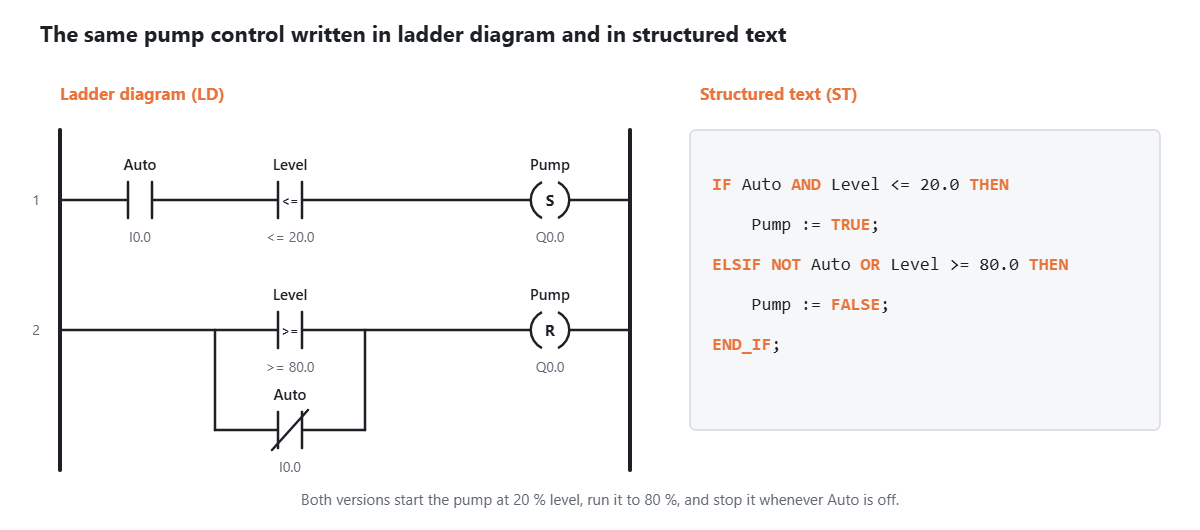
In ladder I use compare contacts with a set coil and a reset coil. In structured text it is an IF with an ELSIF:
IF Auto AND Level <= 20.0 THEN
    Pump := TRUE;
ELSIF NOT Auto OR Level >= 80.0 THEN
    Pump := FALSE;
END_IF;
Between 20 and 80 neither branch runs, so Pump keeps its last value. That is exactly the hysteresis we want, and it is also the first structured text trap, which I come back to below. You can watch the ladder version run in the Ladder Lab simulator: load Tank level control with hysteresis.
Example 3: scaling an analog input
A level transmitter sends 4–20 mA into an S7-1200 analog input, which reads 5530 at 4 mA and 27648 at 20 mA. You need the level in percent as a REAL.
In ladder that is a CONVERT box, a SUB box, a MUL box and a DIV box, each with its own temporary tag, or the NORM_X and SCALE_X pair. In structured text:
Level := (INT_TO_REAL(Level_Raw) - 5530.0) * 100.0 / 22118.0;One line, and anyone can check the formula. If you want to verify the numbers, the 4–20 mA scaling calculator shows the same working.
Example 4: averaging ten readings
A noisy weight signal needs a moving average of the last ten samples. In structured text with an array and a loop:
Sum := 0.0;
FOR i := 0 TO 9 DO
    Sum := Sum + Samples[i];
END_FOR;
Average := Sum / 10.0;
In ladder you would need indirect addressing, a loop built from jumps and a counter, or ten ADD boxes. This is where structured text is clearly the right tool.
Example 5: a fill, mix and drain sequence
Sequences are where the two languages are closest. A batch tank fills to 80 %, mixes for 2 minutes, then drains to 5 % and waits for the next Start. In structured text a step number and a CASE statement keep it tidy:
tMix(IN := (Step = 20), PT := T#2M);

CASE Step OF
    0:  IF Start THEN Step := 10; END_IF;
    10: IF Level >= 80.0 THEN Step := 20; END_IF;
    20: IF tMix.Q THEN Step := 30; END_IF;
    30: IF Level <= 5.0 THEN Step := 0; END_IF;
END_CASE;

Fill_Valve  := (Step = 10);
Mixer       := (Step = 20);
Drain_Valve := (Step = 30);
Two details make this robust. The timer is called outside the CASE, so it is scanned every cycle and resets as soon as the step changes. And the outputs are assigned from the step number after the CASE, so no output can be left stuck on when the sequence moves on.
In ladder you would give each step its own bit, set by the previous step’s transition and reset by the next, with one rung per output. That takes more rungs, but the active step lights up on screen, which operators and technicians love. Both are good choices; for long sequences with branches, SFC is worth a look too.
Timers and counters in structured text
Function blocks work the same way in both languages; in structured text you call the instance and read its outputs:
tStart(IN := Run_Request, PT := T#5S);
Horn     := Run_Request AND NOT tStart.Q;
Conveyor := tStart.Q;
That is the conveyor warning horn from my PLC timers guide, in three lines. Make sure each instance is called exactly once per scan, just as you would never use the same timer on two rungs.
Four traps in structured text
- An IF without an ELSE remembers. If you write IF Sensor THEN Lamp := TRUE; END_IF; the lamp turns on and never turns off. That code behaves like a SET coil. Either add the ELSE, or write a plain assignment: Lamp := Sensor;
- Loops cost scan time. A FOR loop over a large array, or a WHILE loop that waits for something, runs inside one scan. If it runs too long the CPU exceeds its maximum cycle time and faults. Never wait in a loop; let the scan cycle do the waiting.
- Edges need instances. There is no P contact in text. Use the standard R_TRIG and F_TRIG function blocks, one instance per signal.
- Online debugging is less obvious. You see values, not power flow. Keep routines short and well named so a technician can still find which condition is blocking an output.
Does one run faster?
On modern controllers both languages are compiled, so for ordinary logic the difference in scan time is small. Badly written code in either language is slower than well-written code in the other. Choose for clarity and maintainability, not speed.
How to mix ladder and structured text in one project
The split I recommend, and the one most machine builders use:
- Ladder for I/O mapping, safety-related interlock status, motor control, alarms and the main machine sequence. These are the parts maintenance staff open at 2 a.m.
- Structured text inside function blocks for scaling, calculations, recipe handling, data logging, string handling and communication parsing.
In TIA Portal, write an SCL function block and call it from a LAD network like any other box. In Studio 5000, each routine has its own language, so a ladder routine can call an ST routine with JSR. In CODESYS, every program organisation unit (POU) picks its own language. The ladder caller stays readable, and the hard maths stays testable in one place.
Which should you learn first?
Learn ladder first. Most of the machines you will maintain already run ladder, it teaches you to think in scans and interlocks, and the symbols map straight onto the control circuits you already know. My ladder logic symbols cheat sheet is a good companion while you learn.
Then add structured text as soon as you meet your first calculation or array. If you have written any code before, it will feel familiar within a week. Start with my practical introduction to structured text and the guide to PLC data types, because type conversions are where most new ST programmers get stuck.
For more viewpoints, Control.com has a useful comparison of structured text and ladder logic, and AutomationDirect’s ladder versus structured text article covers the same debate from a vendor’s side.
Frequently asked questions
Is structured text better than ladder logic?
Neither is better overall. Structured text is better for maths, loops and data handling; ladder logic is better for discrete control and online troubleshooting by maintenance staff. Most good projects use both.
Which PLC programming language is used most?
Ladder logic is still the most widely used language for discrete machine control, especially in plants with electricians maintaining the code. Structured text use keeps growing, mainly with machine builders and in process and motion applications.
Is structured text hard to learn?
Not if you have written any code before; the syntax is small and close to Pascal. The harder part is thinking in scan cycles: no waiting loops, and every output must be written deliberately on every scan.
Can you convert ladder logic to structured text?
Yes. Each rung is a Boolean expression, so it can be rewritten as an assignment or an IF statement. Some tools offer automatic conversion, but the result is usually harder to read than code written for structured text from the start.
Is structured text the same as SCL?
SCL (Structured Control Language) is Siemens’ implementation of IEC 61131-3 structured text, with some Siemens extensions. Code written in standard ST usually moves into SCL with small changes.
Keep going
Want the next tutorial in your inbox? Join the newsletter, one practical tutorial a week, or download the free eBook Introduction to Ladder Logic Programming and I/O Configuration from the resources library.
About The Author