
Ask five people in an automation shop to define SCADA, HMI, and PLC, and you’ll often get five overlapping, slightly wrong answers. It’s an easy mix-up: all three terms show up in the same job postings, the same vendor catalogs, and the same conversations about “the control system,” and in casual speech people frequently use them as if they’re interchangeable, or as if one supersedes the other. They don’t, and none of them do.
The clearest way to understand the three is that they answer three different questions. A PLC answers: what should happen right now, in this specific piece of equipment? An HMI answers: how does a person see and interact with what’s happening? And SCADA answers: how does an organization monitor and supervise all of that across many machines, or across an entire site or region? Once that separation clicks, most of the everyday confusion about these terms’ resolves on its own.
Three Different Jobs: Defining Each Layer
PLC – the layer that controls the process
A programmable logic controller (PLC) is the hardware that executes real-time control logic — reading inputs, running a program (in ladder logic, structured text, or another IEC 61131-3 language), and driving outputs, all within a tight, repeating scan cycle measured in milliseconds. A PLC can run its process completely on its own; whether or not any human is watching, or any screen is connected, has no bearing on whether the PLC keeps controlling its equipment. It is the layer where decisions actually get executed.
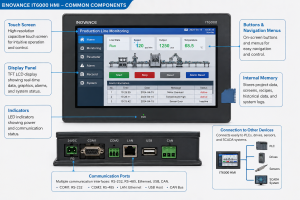
HMI – the layer that lets a person see and interact
A human-machine interface (HMI) is the screen, physical touchscreen panel or software running on a PC, that displays what a PLC (or several PLCs) is doing and lets an operator interact with it: pressing a virtual button to start a motor, entering a recipe setpoint, or acknowledging an alarm. An HMI doesn’t execute control logic itself in most conventional setups; it reads and writes tags in a connected PLC and renders that data graphically. An HMI is typically local, mounted on or near the machine it represents.
SCADA – the layer that supervises across many machines or sites
SCADA (Supervisory Control and Data Acquisition) is the system that aggregates data from many PLCs and/or RTUs, often spread across a large facility, a whole plant, or a geographically distributed network like a pipeline or utility grid, into one central point of visibility and control. SCADA typically includes its own central server, its own HMI-style graphical screens (which is a major source of the SCADA/HMI confusion), a communication network tying the remote field devices together, and a historian for long-term data logging.
The Core Confusion: SCADA Includes an HMI, but an HMI Isn’t SCADA
Most of the confusion between SCADA and HMI comes from a genuinely reasonable place: a SCADA system’s operator screens are, technically, a form of HMI. Both display live process data graphically and let an operator interact with it. The difference is scope and architecture, not the visual experience of looking at a screen.
A standalone HMI is typically wired to a single PLC (or a small handful) controlling one machine or a small local process, a panel mounted right on a packaging machine, showing that machine’s status and nothing else. A SCADA system’s screens sit on top of an entire fleet of PLCs and RTUs, often spread across a wide geographic area, backed by a central server that’s aggregating and historizing data from all of them at once. A single-machine HMI answers “what is this machine doing.” A SCADA screen answers, “what is every piece of equipment across this whole site or region doing, right now, and what has it done historically.”
This is also why SCADA is described as an architecture or a system rather than a single piece of hardware, while an HMI is usually one physical panel or one software application. You can have an HMI with no SCADA behind it, a machine builder shipping one packaging line to one customer usually does exactly that. You cannot meaningfully have SCADA without some form of HMI, because an operator needs a screen to see what the SCADA server has aggregated; the HMI is simply one component nested inside the larger SCADA system.
Side-by-Side Comparison: SCADA vs HMI vs PLC
| Attribute | PLC | HMI | SCADA |
| Primary job | Executes real-time control logic | Displays data and takes operator input for one machine/area | Aggregates and supervises many PLCs/RTUs across a site or region |
| Typical scope | One machine or process | One machine or local area | Whole plant, facility, or geographically distributed network |
| Runs independently? | Yes, controls its process with or without a screen | No, reads/writes to a connected PLC | No, depends on field PLCs/RTUs for the data it aggregates |
| Includes a historian? | No (may log limited local data) | Rarely, or very limited | Yes, typically a core component |
| Physical location | Mounted at or near the equipment | Mounted at or near the equipment | Central control room server, often with remote field connections |
| Example | Controls a single conveyor’s motor and sensors | Touchscreen on that conveyor showing speed and faults | Control room screen showing every conveyor across the whole facility |
How the Three Layers Work Together in a Real System
The three layers aren’t alternatives to choose between; in most real facilities, all three exist at once, stacked on top of each other. Tracing one signal through all three layers makes the relationship concrete.
Note that the PLC in this example works the same way whether or not the SCADA layer exists at all; it’s still reading its sensor and running its logic. What SCADA adds is visibility and coordination across many of these PLCs at once, which becomes essential once a facility has more equipment than one person can watch by walking around, or when equipment is spread across distances that make walking around impossible in the first place.
A Practical Example: Small Machine vs Large Facility
Consider two situations that make the boundary lines obvious.
A single packaging machine
A standalone case-packing machine has one PLC controlling its servos and sensors, and one HMI touchscreen mounted on the machine frame for the line operator to start, stop, and troubleshoot it. There’s no SCADA here at all: one machine, one local operator, no need to aggregate data across anything, so the SCADA layer would add cost and complexity without solving a problem anyone has.
A multi-line bottling plant
The same style of packaging machine now exists on six different lines throughout a large plant, each with its own PLC and local HMI exactly as before. But now there’s also a central SCADA system pulling data from all six lines (and from the rest of the plant’s utilities, tanks, and conveyors) into one control room, where a small supervisory team watches overall plant throughput, gets consolidated alarm notifications, and can pull up historical trend data for any line going back months. Nothing changed about how each PLC and HMI works; what changed is that a supervisory layer was added on top because the scale of the facility now justifies it.
FAQ: SCADA vs HMI vs PLC Questions Answered
Is a SCADA system the same thing as an HMI?
No, though a SCADA system does include HMI-style screens, which is the main source of confusion. An HMI is typically a local screen tied to one machine or process. SCADA is a larger architecture that aggregates data from many PLCs or RTUs across a site or region, and its operator screens are just one component of that larger system, alongside a central server, network, and historian.
Does a PLC need SCADA or an HMI to function?
No. A PLC executes its control logic independently based on its own inputs and program, regardless of whether any screen or supervisory system is connected. HMI and SCADA both exist to give people visibility and control over what the PLC is already doing; they’re additions for the operator’s benefit, not requirements for the PLC’s own operation.
Can a system have an HMI without SCADA?
Yes, and this is extremely common; most standalone machines built by a single manufacturer have a local HMI wired to their PLC with no SCADA system involved at all. SCADA becomes relevant once there are multiple machines, remote sites, or a facility-wide need for centralized supervision and historical data, not for a single self-contained machine.
Can a system have SCADA without a PLC?
Not typically, since a SCADA system needs field devices to gather data from, and those are almost always PLCs or RTUs. SCADA is the supervisory layer sitting on top of field control devices, not a replacement for them; the field-level logic still has to live somewhere, and that’s the PLC or RTU’s job.
Which one should I learn first: PLC, HMI, or SCADA?
PLC programming is the usual starting point, since HMI and SCADA both exist to display and supervise data that a PLC is generating in the first place; understanding the field-level logic makes the higher layers make sense in context. Most controls engineers learn PLC fundamentals first, then HMI configuration, then SCADA architecture as their scope of responsibility grows.
Key Definitions
PLC (Programmable Logic Controller): A ruggedized industrial computer that executes real-time control logic for a specific machine or process, reading inputs and driving outputs within a repeating scan cycle, independent of any connected display or supervisory system.
HMI (Human-Machine Interface): A local screen, panel-mounted or software-based, that displays a connected PLC’s data graphically and lets an operator interact with that specific machine or process, typically scoped to one piece of equipment or one local area.
SCADA (Supervisory Control and Data Acquisition): A supervisory system that aggregates data from many PLCs and/or RTUs across a site or geographic region into a central server, historian, and set of operator screens, giving a small team visibility and control over equipment that spans more distance or complexity than any one local HMI could cover.
Learn More About HMIs
About The Author